
How to Share Class Photos with Parents Safely

Sharing class photos safely comes down to three decisions: who owns the photos, who can see them, and what parents have agreed to. Many teachers make those decisions by default when using a personal phone, a group chat, or a social media account, and that is where student privacy slips.
This guide explains what to avoid, what the law actually says about student photos, and how to set up a private, school-controlled way to share moments with families.
Why personal phones and group chats fall short
The photos themselves are rarely the problem. The problem is where they travel after they are taken.
-
Nobody at the school can see where they went. A single field trip can end up on teacher phones, parent phones, email threads, a Facebook group, and a shared drive link. The school cannot tell who has access to which photos.
-
The photos leave with the teacher. When images live in a personal account or camera roll, the school loses them when that teacher changes roles or leaves.
-
Consent is hard to track. Once a photo is in a group chat or a public group, you cannot control who saves it, forwards it, or reposts it.
-
Families get left out. Parents who aren’t in the right chat or group never see the photos.
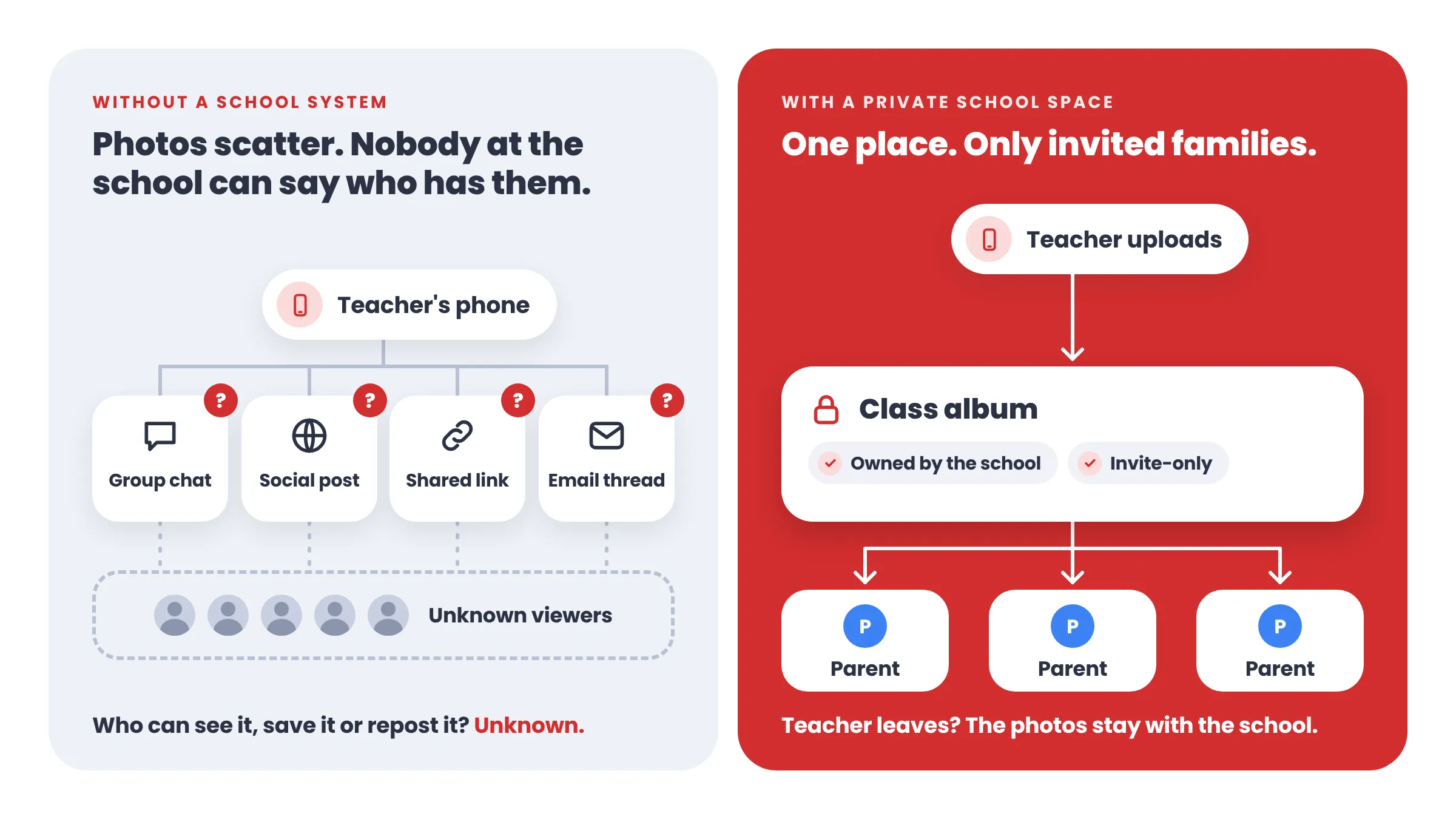
A safer setup gives the school ownership, controls who can see each photo, and keeps a clear record of the rules parents agreed to.
When a class photo counts as a student record
Under FERPA, a photo or video is an education record when it is directly related to a student and the school, or a party acting for the school, keeps it. The U.S. Department of Education’s FAQ on photos and videos under FERPA lists when that is the case:
-
The image is tied to discipline or shows a student violating the law.
-
It shows a student who is injured or in a health emergency.
-
It focuses on a specific student.
-
It contains personal information from education records.
Images where a student is incidental or in the background, or that show an open public school event without a specific individual in focus, generally are not education records. A single image can also be an education record for multiple students.
In practice, a photo of a child at the center of a classroom activity is more likely to be a student record than a wide shot of an assembly. That is a reason to treat every class photo carefully and keep it inside a private, school-controlled space.
This is general information, not legal advice. Many districts add their own media release or directory-information policy on top of FERPA, so check yours before you share.
A consent checklist for teachers and schools
Review this checklist before sharing the first photo of the school year.
- Check your district’s media release or directory-information policy, and know which students have opted out.
- Tell families up front what you share, where, and who can see it.
- Ask parents to agree to simple sharing rules, such as no reposting photos on social media or other public sites.
- Share only through a space the school controls, never a personal account.
- Turn off public links, or keep them to a minimum and a short list of approved uses.
- Decide whether parents can only view photos or can also upload, comment, share, or download them.
- Require approval for parent-uploaded photos, if parents are allowed to post.
- Choose who can remove a photo, and how a family can ask for one to be removed.
- Share group and activity shots first. Share close-ups of individual children only when the necessary consent has been obtained.
- Name one person at the school who owns the process and answers questions.
A safe way to share, step by step
Whatever tool you use, a safe setup has the same five parts.
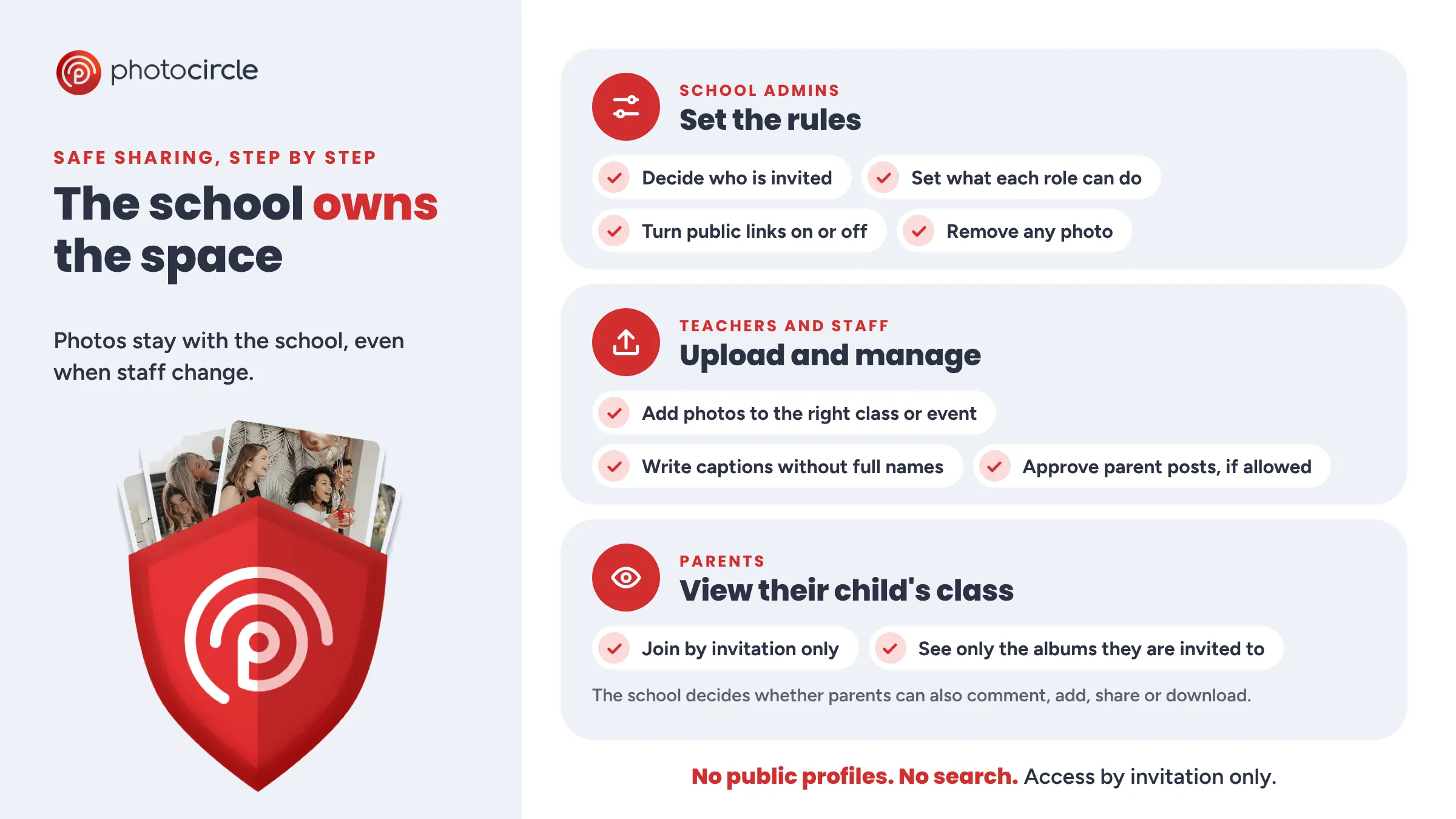
- The school owns the space. The school owns the photos, not a teacher’s account, so nothing is lost when staff changes.
- Access is by invitation only. Families join a private space for their child’s class. There are no public profiles, and nobody can search for your students or school.
- Roles are clear. Teachers and staff upload and manage photos. Parents view, and the school decides whether they can also add, comment, share, or download.
- Public links are the exception. A link that works without a login can travel anywhere. Turn it off, or limit it on purpose.
- Rules are visible. Parents see the sharing guidelines before they upload, save, or share anything.
If uploading photos takes teachers more than a minute or two, they will go back to their own phones. Pick a tool that is as quick as a messaging app, or the safe option will not get used.
How PhotoCircle helps schools share safely
PhotoCircle is built around that setup. Each class, team or event gets a Circle, which is a private album families join by invitation.
| What you need | How PhotoCircle handles it |
|---|---|
| School ownership | The school owns every photo. Staff lose access when they leave, and the photos stay. |
| Private access | Circles are invite-only, with no public profiles. No one can search for your students or school. |
| Clear roles | Teachers and staff join as Contributors or Moderators. Parents join as Guests, and the school determines what Guests can do: view only, or also add photos, comment, share, or download. |
| Public links | Web Share, which creates a link that opens up to 20 photos or videos without a login, can be switched on or off in the Admin Console. Enable it only after carefully considering the privacy implications. |
| Parent uploads | Moderation holds Guest photos and comments until a Moderator approves them. |
| Sharing rules | Choose guidelines Guests see before they upload, save, or share, such as “Don’t repost photos or videos from this circle on social media or other public sites.” |
| Watermarks | A small school logo appears on photos when Guests view or download them. Staff never see it. This feature is not available on every plan. |
| Event photos | Print a Circle’s QR code so families can scan and upload during an event. |
The school also sets a standard consent statement for Guests who upload photos. It covers only photos they upload, never photos they appear in, and Guests under 18 cannot provide marketing consent.
For student data privacy, PhotoCircle is SOC 2 Type II certified and supports FERPA, COPPA, GDPR, and US state privacy laws. It has signed student data privacy agreements in 17 states. Your district can contact PhotoCircle to set up an agreement.
To get started, a Workspace Owner or Admin works through the PhotoCircle Admin Console setup checklist: create Groups, set roles and permissions, add guidelines, turn on moderation, and invite teachers. Most organizations complete the setup in 15–30 minutes.
Frequently asked questions
How do teachers share class photos with parents safely?
Use a private space the school owns, invite parents individually, set clear sharing rules, and avoid personal accounts and public links.
Do teachers need permission to share photos of students?
It depends on the photo and on district policy. A photo focused on a specific student is more likely to be an education record under FERPA. Check your district’s media release or directory-information policy, and ask the school’s privacy lead if you are unsure.
Is it safe to share class photos in a WhatsApp or Facebook group?
It is risky. The school cannot control who joins, saves, or reposts the photos, and the photos often stay with the individual teacher.
Can parents see only their own child’s class?
Yes. With Circles, parents are invited to the specific class, team, or event, and the school controls what they can do there.
What happens to the photos when a teacher leaves?
When the school owns the space, the photos stay with the school, and the teacher’s access ends.